The details travel together.
A name you recognize. The original invitation. An optional password. A note to remind you what it’s all about. Save it once, find it next time.
 Meeting Pins
For Mac, iPhone, and iPad
Your regular Zoom meetings deserve a permanent home. Keep the links, passwords, and little details together—then find them on your Mac, iPhone, or iPad.
Launching on iPhone and iPad. Mac App Store release awaiting Apple review.
New · Universal purchase
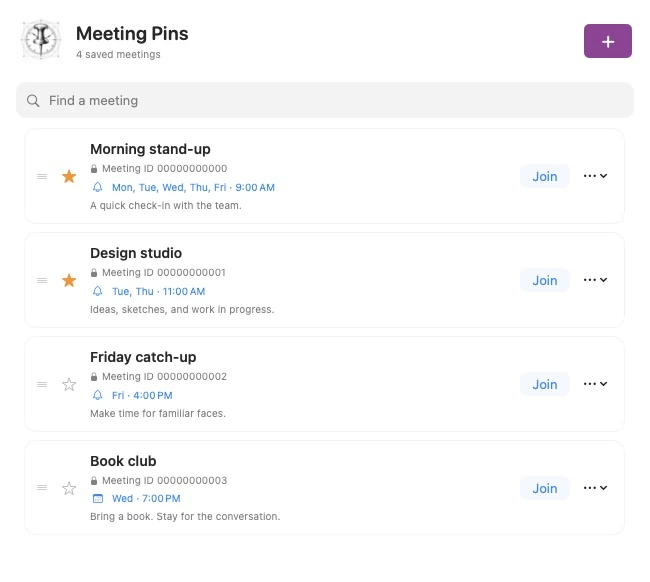
Meeting Pins now brings your regular meetings to iPhone and iPad, alongside the native Mac app. One $1.49 purchase covers all three platforms, with your bookmarks, notes, passwords, and schedules kept together through private iCloud sync.
A focused list on iPhone. A roomy sidebar and detail view on iPad. Quick menu-bar access on Mac. Each version feels at home on its device.
iPhone and iPad are launching now. The Mac App Store version is awaiting Apple review and will be included in the same purchase when released.
Now on sale — $1.49 USDLess searching. More showing up.
A name you recognize. The original invitation. An optional password. A note to remind you what it’s all about. Save it once, find it next time.
Arrange meetings in the order that makes sense to you. Star your regulars and search your library. On Mac, open the larger management window when you want more room.
Your bookmarks, schedules, and order sync through your private iCloud account. Offline edits stay on your device until syncing is available.
Make a little room for routine
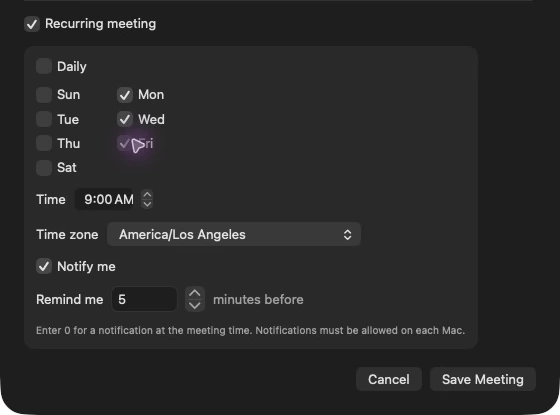
Monday stand-up. Wednesday book club. A daily check-in. Give each meeting its own days, time zone, and optional reminder.
Keep Meeting Pins running on Mac and open it regularly on iPhone and iPad to refresh upcoming alerts. Focus and system settings can affect delivery.
From invitation to meeting
Three small steps. One less thing to track down.
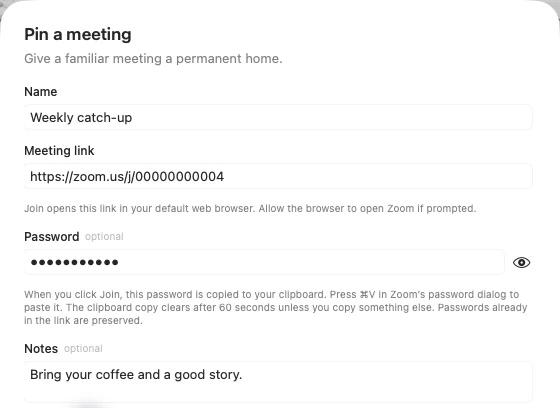
Click + and paste the full HTTPS Zoom link. Add a familiar name and any separate password or notes.
Open Meeting Pins on iPhone or iPad, or click the pin in your Mac menu bar. Your library is there, with search, favorites, and your chosen order.
Join opens the original invitation in Zoom or your browser. A separately saved password is copied for you to paste when Zoom asks.
Your meetings stay yours
No Meeting Pins account to create. No advertising or analytics SDKs. Your bookmarks live in the app’s local sandbox and sync through your private iCloud database.
Meeting names, links, passwords, notes, and schedules use encrypted CloudKit fields. Copied links and passwords expire after 60 seconds. On iPhone and iPad, copies stay local to the device.
Read the privacy policyFits right into your Mac
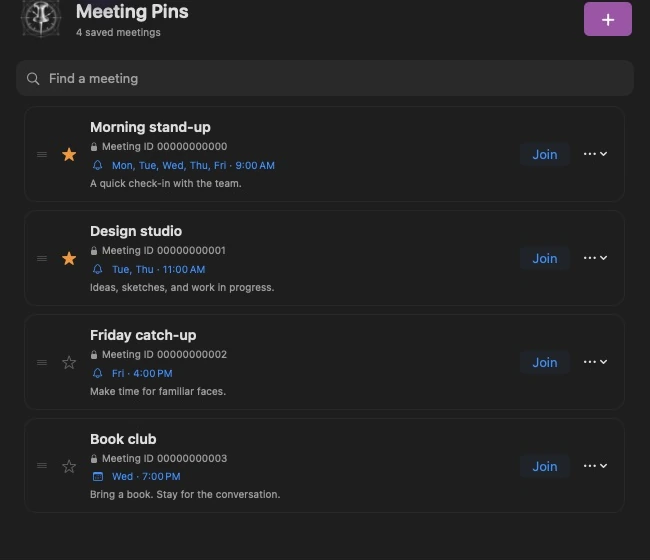
Choose Light, Dark, or Auto to follow your Mac. Open at login if you’d like your meeting library ready when your day begins.
Native Mac app
macOS 14 or later
Intel and Apple silicon
Now on sale · Universal purchase
Buy once for Mac, iPhone, and iPad. Start on iPhone and iPad today; the Mac App Store version will be included when Apple completes its review.
Yes. Meeting Pins is a universal purchase: pay once and download it on your compatible Mac, iPhone, and iPad using the same Apple Account. The iPhone and iPad version is launching now; the Mac App Store version is awaiting review and will be included when released. The US price is $1.49, with no subscription or in-app purchases. Regional prices vary.
No. Meeting Pins keeps your invitations organized and opens the original link in Zoom or your browser. Zoom, your browser, and the meeting host still handle sign-in, browser confirmation, registration, and waiting rooms. Meeting Pins does not host or record meetings.
Use the same Apple Account with iCloud enabled to sync between Mac, iPhone, and iPad. Bookmarks remain available locally when iCloud is temporarily unavailable, and offline edits sync when a connection is available. Notifications and appearance are configured independently on each device.
Already queued reminders can appear while the app is closed, but keep Meeting Pins running on Mac and open it regularly on iPhone and iPad to refresh the next 60 alerts and pick up schedule changes. On Mac, you can enable launch at login in Settings. Focus, sleeping Macs, and system notification settings can affect delivery.
Visit Meeting Pins Support for setup and troubleshooting, or email support@jason.fyi. Leave meeting links, passwords, and private notes out of support messages and screenshots.